Whether you’re a DIY mechanic or a professional technician, you can diagnose and monitor vehicle health from your laptop with the right OBD2 tool. This guide highlights five laptop-friendly scan tools that provide clear data, live readings, and trouble-code management. Best for garage spaces, mobile setups, and shop work alike, these options cover general engine codes, live data, and system checks. Readers should pick based on compatibility with vehicles, data readouts, and ease of use on a laptop environment.
Summary of Selected Products
| Product | Best For | Connectivity | |
|---|---|---|---|
| ANCEL AD310 Classic Enhanced Universal OBD II Scanner | Budget-friendly quick diagnostics | Read/clear codes, live data, freeze frame, emissions, I/M readiness | OBDII |
| FOXWELL NT604 Elite | All-in-one check engine plus ABS/SRS | 5-in-1: OBDII, ABS, SRS, transmission, live data | OBDII |
| BlueDriver Pro Next Gen | Smartphone-to-diagnostic with professional depth | 8000+ issues, repair reports, VIN-linked fixes, live data | Bluetooth (Phone) |
| TOPDON ArtiDiag900 Lite | Bi-directional testing in a modern tablet | Active tests, 8 resets, wireless, DoIP, CANFD | Bluetooth/Wi‑Fi (Wireless) |
| MOTOPOWER MP69033 | Simple, wide-vehicle coverage on a budget | 9 protocols, live data, I/M readiness, data flow | OBDII |
ANCEL AD310 Classic OBD II Scanner
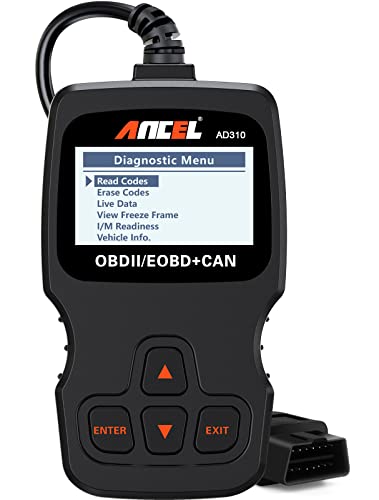
The ANCEL AD310 is a compact, budget-friendly OBD II scanner designed for quick fault-code reading and clearing on 1996-and-newer vehicles. It offers live data, freeze frame, I/M readiness, and data memory access. Best for DIYers who need fast results without extra features.
Who this is for: Home mechanics, students, and enthusiasts who want a simple, portable tool for basic diagnostics on standard OBDII cars.
Why selected: It covers essential reading and clearing of emissions-related codes with a straightforward interface and a sturdy, compact build. No battery required; power comes from the vehicle’s OBDII port.
Limitations: It does not provide bi-directional control or advanced system testing beyond core OBDII functions.
FOXWELL NT604 Elite OBD2 Scanner

The FOXWELL NT604 Elite is a 5-in-1 diagnostic tool that targets engine faults and also covers ABS and SRS, with live data and I/M readiness checks. The 2026 version emphasizes ease of use right out of the box and stands out for owners who want a broader diagnostic sweep without needing software setup.
Best for: Car owners who want a single tool to quickly identify problems across multiple systems (engine, ABS, SRS) and verify readiness for inspections.
Why selected: Includes ABS/SRS and transmission checks, which makes it more comprehensive than basic code readers. It clearly labels that some functions require physical repairs before clearing codes, aiding realistic expectations.
Limitation: Not a repair tool; clearing codes requires addressing root causes first, and some advanced functions are not universal across all vehicles.
BlueDriver Pro Next Gen OBD2 Scanner
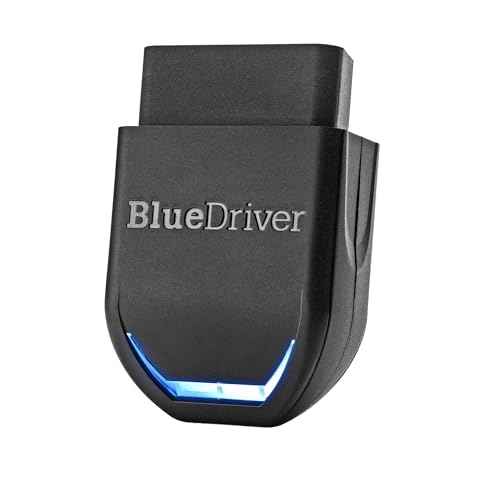
The BlueDriver Pro Next Gen turns a smartphone into a professional diagnostic tool. It offers extensive code reading and clearing, enhanced diagnostics across Check Engine, ABS, SRS, TPMS, and more, plus technician-verified repair reports tied to VINs. Real-time data and freeze-frame viewing support deeper insights for repairs.
Best for: Serious DIYers and professionals who want an expansive, subscription-free ecosystem with clear repair guidance and mobile convenience.
Why selected: Strong code coverage and repair reporting, with continuous updates and a robust data library that aligns with vehicle history and VIN-based fixes.
Limitation: Relies on a compatible smartphone and Bluetooth connection; some advanced vehicle systems may require vehicle-specific coverage permissions.
TOPDON ArtiDiag900 Lite Bidirectional Scan Tool

The TOPDON ArtiDiag900 Lite offers advanced hardware with Android 11, a fast CPU, and a large touchscreen. It introduces bidirectional control for active testing, plus wireless diagnosis and battery testing options. This makes it a strong choice for professionals seeking faster, more interactive diagnostics without cables.
Best for: Workshops or serious hobby shops needing bidirectional testing and robust features in a portable package.
Why selected: The bidirectional capability can significantly reduce diagnostic time by actively testing components. A long wireless range and modern OS support improve usability in tighter spaces.
Limitation: Higher complexity and potentially higher cost; some features may require ongoing connectivity or updates.
MOTOPOWER MP69033 OBD2 Scanner

The MOTOPOWER MP69033 supports 9 protocols and a broad vehicle range, including many 1996 and newer models. It provides a clear 2.8″ LCD display, live data, DTC lookup, I/M readiness, and engine info. It is powered directly via the vehicle, without batteries or chargers.
Best for: Budget-conscious buyers who need broad vehicle compatibility and a straightforward display for quick checks.
Why selected: Combines wide protocol support with a simple interface and standalone operation, which is practical for everyday diagnostics.
Limitation: Lacks advanced bidirectional features and some newer vehicle requirements may need more capable tools.
Buying Guide
Key questions to guide your selection:
- What vehicles will you diagnose? Look for a tool with broad protocol support (OBDII, CAN, etc.) and model-year coverage that fits your fleet.
- Do you need bidirectional control or live data depth? Bidirectional tools can test components, while basic readers focus on codes and freezes.
- Will you connect to a laptop or smartphone? Some devices pair with laptops via USB, while others use Bluetooth or Wi‑Fi with mobile apps.
- Is software updates and data definitions important? Tools with regular updates and repair databases save time and improve accuracy.
- What is your budget and expected use? Budget scanners suit basic needs, while premium models offer extensive diagnostics, ABS/SRS checks, and DoIP.
FAQ
- Are laptop-compatible OBD2 tools common? Yes. Many tools offer PC-friendly interfaces via USB or Bluetooth, and some pair with apps on phones that can sync with laptops.
- Can I clear codes without repairing the problem? Clearing codes is allowed after underlying issues are addressed; some tools require repair before code clearance.
- Do all tools read ABS/SRS data? No. Basic readers focus on engine codes; expanded models include ABS, SRS, and transmission data.
- Do I need an internet connection to use these tools? Some tools rely on online databases for repair guidance; others provide offline DTC definitions locally.
- Is bidirectional testing essential for home use? It depends. For most home users, reading, clearing codes, and viewing live data suffice; bidirectional tools are more advanced.
- Can I use these tools with iPhone and Android? Many offer mobile apps; check compatibility with your device and OS version.