Answering the need for a secure, adjustable laptop mounting solution in vehicles, these computer mounts keep devices stable, cool, and easy to view while driving or parked. They’re best for mobile professionals, fleet drivers, and remote workers who require quick setup, no-drill installation, and flexible positioning. The top picks here balance cooling, stability, and ergonomic adjustment to reduce neck strain and improve driving visibility. Below, you’ll find a concise buying guide and a quick comparison table of the five best options.
| Product | Best For | Key Benefit | Limitations |
|---|---|---|---|
| MELIPRON Truck Laptop Mount (B0CSYBN83T) | Fleet drivers and on-site technicians | Dual cooling fans and rugged, no-drill install | May require seat rail access; heavier build |
| VIVO MOUNT-CAR01 | Cars, trucks, vans with floor bolts | Wide compatibility and full articulation | Ventilation depends on model; installation space needed |
| SPIRRELAB Car Laptop Mount (B0D9N2NW74) | Professional crews with heat-sensitive laptops | Built-in fans and durable aluminum/tray construction | Heavier; requires robust mounting area |
| Mount-It! Car Laptop Mount (B017AGOVZ6) | Casual commuters to mobile workers | No-drill, height-adjustable, full motion | Tray size limits some larger laptops |
| Mobotron MS-426 | High-stability needs with less movement | Fully adjustable tray and movement controls | May require more mounting space |
MELIPRON Truck Laptop Mount with Cooling Fans

This no-drill, vehicle-specific mount is designed for heavy-duty use and rough roads. It features built-in dual USB cooling fans to prevent laptop overheating and a rugged aluminum-steel frame for stability. The height and tilt are adjustable with a 360° swivel for optimal viewing angles. Best for fleet vehicles and drivers who need quick installation without modifying the car’s structure. Limitation: installation relies on passenger seat rail access and may require precise bolt alignment for secure mounting.
Who it’s best for: Fleet drivers, contractors, and field technicians who prioritize cooling, stability, and a non-permanent install.
VIVO Single Laptop Car Mount — Full Range Of Motion
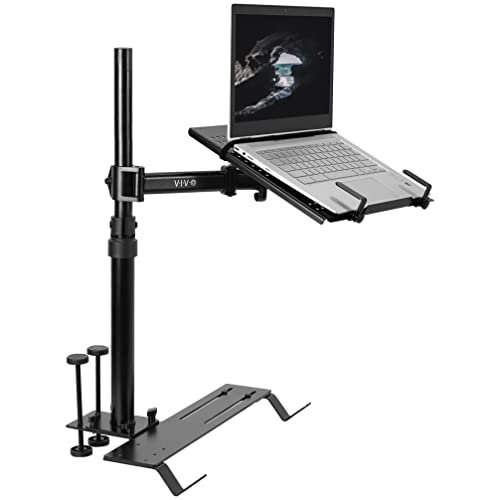
This mount emphasizes broad vehicle compatibility through multiple mounting feet and an adjustable telescoping pole. It supports laptops up to 17” and 11 lbs, with a ventilated tray to aid cooling. Full articulation allows tilt, swivel, rotation, and a height range from 18.5” to 26.3”. Best for users who drive a variety of vehicle types and need precise ergonomic control. Caution: larger, heavier laptops require careful balance to prevent tray tilt on rough roads.
SPIRRELAB Car Laptop Mount With Fans

This mount combines two built-in USB cooling fans with a stable base and heavy-duty aluminum body. It provides a secure 9–17″ device fit range, graded for 5 kg capacity, and five adjustable clamps to prevent slippage. Best for professionals who keep a laptop running during long trips or require extra cooling. Limitation: heavier build may be less ideal for smaller cars with tighter interiors.
Mount-It! Car Laptop Mount — No-Drill

This no-drill passenger-seat mount is designed to fit 12″–15.4″ laptops up to 9 lbs and offers full motion with height adjustment. It helps convert a vehicle into a portable workspace when parked. Best for casual commuters who need an easy-to-remove setup. Limitation: not all 17” laptops will fit comfortably depending on the model and keyboard layout.
MELIPRON Truck Laptop Mount For Ford And More

This Melipron model targets popular truck configurations (Ford F-Series variants, etc.) with no-drill installation and a two-fan cooling system. It offers a broad height range and a 360° rotatable tray for flexible positioning. Best for drivers of common heavy-duty trucks who want a stable, cool setup without altering seat rails. Caution: vehicle-specific fit may vary by model year and seat mounting space.
Buying Guide
Key purchase considerations when selecting a car laptop mount include installation method, device compatibility, cooling capability, and range of adjustment. Consider the following:
- No-Drill vs. Drill-Required: No-drill options are ideal for renters and fleets, but check that the seat rail area is accessible and secure. Drill-required mounts can offer enhanced stability in some cases, but they alter the vehicle.
- Device Size And Weight: Ensure the tray can accommodate your laptop’s width, depth, and weight. If you use large 17” laptops, prefer mounts with bigger trays and stronger clamps.
- Cooling And Heat Management: Built-in fans help prevent overheating during long drives or intensive workloads. For high-heat environments, a mount with active cooling is advantageous.
- Range Of Adjustment: Look for full motion, tilt, swivel, and height adjustability. Correct ergonomics reduce neck and shoulder strain and improve sightlines to the road.
- Stability And Safety: A stable base, solid joints, and secure clamps prevent movement during bumpy roads. A triangular or multi-point base often improves stability.
- Vehicle Compatibility: Some models target specific vehicles or seat arrangements. Check fit notes and installation diagrams for your car, truck, or SUV.
FAQ
- Do these mounts require tools to install? Most no-drill models require minimal tools or use existing seat bolts; installation complexity varies by model.
- Will a laptop over 17 inches fit? Some mounts support up to 17″ laptops, but verify tray dimensions and weight limits before purchase.
- Can I switch between different vehicles? Many mounts are semi-portable but some mounting bases are vehicle-specific. Check whether the base is removable.
- Is cooling necessary for all laptops? If a device tends to overheat during long use or in hot climates, built-in cooling is beneficial to protect performance and longevity.
- What is the best choice for fleets? No-drill, easy-remove options offer the best balance of stability, quick deployment, and vehicle preservation for fleets.