Answering the need for safer, distraction-free speed information in older vehicles, these digital HUDs (heads-up displays) project speed and essential data directly into your line of sight. They are ideal for classic car enthusiasts, restoration projects, and drivers who want modern readability without intrusive dashboard changes. This guide highlights five reliable options that balance visibility, ease of use, and universal compatibility. The top picks suit everyday drivers, weekend cruisers, and anyone who values a quick-glance speed readout while keeping eyes on the road.
Summary at-a-glance: the following five HUDs stand out for old-car compatibility, easy plug-and-play setup, and bright, legible displays. The table compares display type, unit options, installation style, and best-use scenarios.
| Product | Display Type | Units | Power/Installation | Best Use |
|---|---|---|---|---|
| KUOWEIHUD K1-White | GPS + BDS dual-mode | MPH | USB Plug & Play | Classic daily driver |
| JiuruApex GPS Digital Speedometer | GPS | MPH/KMH | USB Plug & Play | Global navigation accuracy |
| SINGARO Green HUD | GPS + BDS | MPH | USB Plug & Play | Daily driving with high readability |
| OinDoDi HUD | GPS | MV/Local time | USB or vehicle power | Universal for all vehicles |
| RGZOCT GPS HUD | GPS + BDS | KMH/MPH | Plug & Play, QC3.0 | Versatile vehicle types |
KUOWEIHUD K1-White: Large, Auto-Brightness HUD

This HUD combines dual GPS and Beidou satellite data with a 10 Hz refresh rate for fast, stable speed updates. It projects speed directly into your line of sight for minimal eye movement, helping older-car drivers keep eyes on the road. The built-in light sensor automatically adjusts brightness for day and night use. Best for drivers who want a simple plug-and-play option with strong daytime readability and glare control.
Who it’s best for: daily drivers in classic cars that want a glare-free, large-font display without complicated wiring. Limitations: display brightness may vary under extreme glare conditions, so position the unit to avoid sun glare whenever possible.
JiuruApex GPS Digital Speedometer

This HUD supports both MPH and KM/H with a switch, and uses GPS data to mirror real-time speed. It is plug-and-play, requiring no OBD port connections, which reduces wiring intrusion in older cars. The compact footprint makes it easy to place on most dashboards. Best for drivers who travel between countries or regions and need quick unit switching, plus a non-invasive install.
Who it’s best for: owners who want global compatibility and a compact, universal HUD. Limitations: may be less bright in very bright sun; ensure proper positioning for readability.
SINGARO Green HUD: Glanceable Large Font

The SINGARO HUD emphasizes a high-contrast, large-font display with a simple glanceable readout. It combines GPS and BDS data for reliable speed display with fast response. Day and night readability reduces eye strain and glare, making it suitable for long drives in older vehicles that lack modern digital dashboards.
Who it’s best for: drivers prioritizing large digits and clear daytime/night readability. Limitations: color option shown is green; other colors may vary by listing.
OinDoDi HUD: Universal Car GPS Speedometer
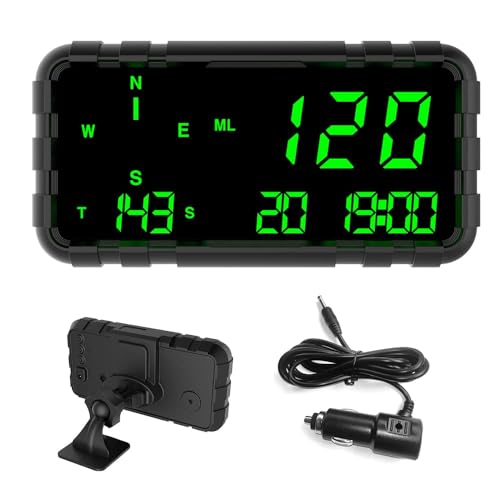
This HUD markets itself as universal for all vehicles because it relies on GPS data rather than the car’s OBD connection. It displays driving speed, direction (compass), time, and mileage. It uses high-temperature-resistant materials and has no internal battery, reducing risk in hot engine bays. Best for owners who want a rugged, true plug-and-play option with multi-data readouts.
Who it’s best for: those seeking a broad-compatibility HUD with extra data fields. Limitations: no built-in battery means you must provide external power; ensure a stable power source.
RGZOCT GPS Heads Up Display

The RGZOCT HUD features dual-display capability with both speed and a clock, supporting KM/H and MPH for versatile use in different regions. It is designed for plug-and-play installation across a wide range of vehicles, including boats and golf carts, and includes QC3.0 fast charging. This makes it a flexible choice for multi-vehicle households or enthusiasts with non-standard vehicles.
Who it’s best for: multi-vehicle users needing a universal, fast-charging HUD. Limitations: as with any GPS-based HUD, readability depends on windshield angle and brightness settings.
Buying Guide: Key Considerations For Selecting A Car HUD For An Older Vehicle
- Display readability: Look for large, high-contrast digits and auto-brightness to adapt to daytime and nighttime driving.
- Power and installation: Prefer USB plug-and-play options to avoid wiring into the vehicle’s electrical system. Check for included cables long enough to reach a convenient power source.
- Global unit support: If you travel or drive in different regions, ensure MPH and KM/H support and an easy switch between units.
- Data accuracy: HUDs combining GPS with multiple satellite systems (GPS + BDS) tend to offer more stable speed readings than simple GPS-only displays.
- Vehicle compatibility: For older cars, a truly universal, non-OBD or non-wired option minimizes risk to wiring and preserves the car’s original electronics.
- Durability and temperature handling: In hot engine bays or sunny dashboards, choose models with heat-resistant housings and glare reduction features.
- Additional data fields: If you want more than speed (time, distance, direction), consider models offering compass and odometer data without adding complexity.
Frequently Asked Questions
- What is a car HUD and how does it help in older cars?
A car HUD projects speed and other vital data onto the windshield or dashboard, reducing the need to glance down at the instrument cluster. This helps drivers keep eyes on the road, which is especially beneficial in vintage or older vehicles lacking modern digital displays.
- Do these HUDs require professional installation?
Most listed options are plug-and-play via USB power, designed for easy DIY install. They typically do not require wiring into the OBD port.
- Can I switch between MPH and KM/H easily?
Yes. Several models explicitly offer MPH/KMH switching, or auto-detect based on region. Check the product features to confirm.
- Will a HUD fit in any dashboard?
Most HUDs are compact and designed for universal compatibility, but you should verify dimensions and your dash layout to avoid obstructing sightlines.
- What data does a typical HUD display beyond speed?
Many units display time, date, and mileage. Some also provide directional data (compass) and clock features for convenience in older cars.
- Are there safety concerns with using a HUD in bright sun?
Brightness adjustment and glare-reducing displays mitigate this. Position the HUD so it remains clearly visible without causing glare on the windshield.