If you’re looking for backseat entertainment, these headrest TVs offer larger screens, smart features, and easy media playback for long trips. The best picks are suited for families, frequent travelers, and tech-minded passengers who want streaming, games, or mirror-casting from phones. Each option below emphasizes reliable connectivity, screen quality, and easy installation to fit most car models.
| Product | Brand | Screen Size | Why It Stands Out |
|---|---|---|---|
| 10.8″ Android 13 Car TV Headrest Monitor | AINAVIGO | 10.8″ | Strong media formats and Android 13 for apps |
| WONNIE 12″ Dual Car DVD Players | WONNIE | 12″ | Dual players for synchronized or separate viewing |
| 10.8″ Android Car TV Headrest Monitor | AINAVI | 10.8″ | Mirror link and app variety with Android |
| 15.6″ 4K Android 13 Car TV Headrest Monitor | Seventour | 15.6″ | Large 4K display and broad app support |
| 10.1″ Android 12 Car Headrest Monitor | Bsldtor | 10.1″ | Android 12 with multiple ports and Bluetooth |
AINAVIGO 10.8″ Android 13 Car TV Headrest Monitor

This headrest monitor uses Android 13 to access apps and streaming services. It features a 10.8-inch IPS touchscreen with 1920×1080 resolution and supports 4K video playback. The device includes 2GB RAM and 32GB ROM, plus dual-band WiFi and phone hotspot compatibility. It’s best for travelers who want a compact, app-enabled system in the backseat and reliable media playback from USB/SD cards or external devices.
Who it’s best for: small to mid-size sedans or SUVs where a single 10.8″ screen suffices and the passenger wants Android apps on the go.
Why chosen: Combines modern Android 13 ecosystem with flexible connectivity and a crisp display, balancing performance and price for backseat entertainment.
Caution: With 2GB RAM, very heavy multi-tasking apps may run slower than higher-RAM models.
WONNIE 12″ Dual Car DVD Players

This model offers two independent 12″ displays so passengers can watch different content or share a single movie via AV linking. It’s designed for stability on bumpy roads with upgraded chips and mounting brackets. USB and region support add flexible media playback, though Blu-ray PC compatibility is not listed. It’s best for larger vehicles where dual screens maximize backseat comfort.
Who it’s best for: families needing parallel viewing options during long trips, especially when children want separate content.
Why chosen: The dual-screen capability and robust mounting make it a practical choice for shared backseat entertainment.
Caution: Not all formats (e.g., Blu-ray) may be supported; ensure your media source aligns with USB/SD capabilities.
AINAVI 10.8″ Android Car TV Headrest Monitor

This Android 13-based model emphasizes screen mirroring and app flexibility. It supports Happycast for wireless phone connectivity and Miracast/AirPlay mirroring. You can customize wallpapers and install apps from Google Play Store. It’s ideal for users who want phone-to-headrest mirroring and broad app access, with MyCar Link for remote control via a phone.
Who it’s best for: households that prioritize screen mirroring and app versatility, including iOS and Android users.
Why chosen: Strong focus on wireless connectivity and screen-mirroring features, useful for families who want quick access to content and remote control from mobile devices.
Caution: Some apps may have mirroring limitations depending on app protections and WiFi configuration.
Seventour 15.6″ 4K Android 13 Car TV Headrest Monitor

This large 15.6-inch 4K Android 13 screen delivers expansive viewing real estate for backseat passengers. It supports 5G/2.4 GHz WiFi and has HDMI output/input, USB, Bluetooth, and dual-USB power options. Universal mounting ensures compatibility with most car models. It’s best for families seeking a high-resolution, multi-connection entertainment hub in the rear cabin.
Who it’s best for: buyers needing a big, high-resolution screen with broad connectivity for multimedia and external devices.
Why chosen: The combination of a large 4K panel and Android 13 ecosystem makes it a strong all-around option for immersive backseat enjoyment.
Caution: The larger screen may require more space and careful mounting in smaller vehicles.
Bsldtor 10.1 Inch Android 12 Car Headrest Monitor
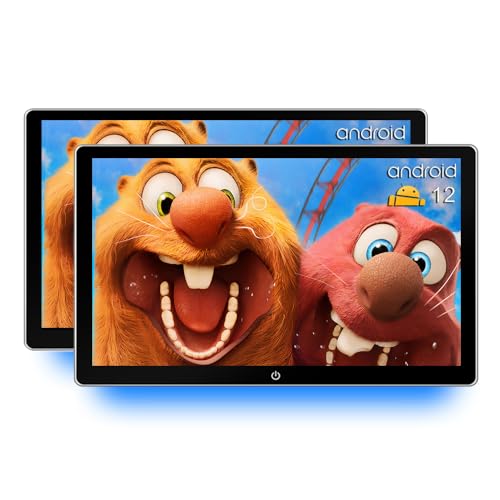
This 10.1-inch option runs Android 12 with 2G RAM and 32G ROM, offering WiFi, Bluetooth, USB, HDMI in, and a dual-monitor setup. It emphasizes a compact footprint with practical media options and FM transmission for car audio. Best for drivers who want a budget-friendly headrest unit without sacrificing essential features.
Who it’s best for: budget-conscious buyers who still want Android app access and multiple input options for media playback.
Why chosen: Solid core features in a compact form factor, with flexible ports and wireless options to match most front-seat setups.
Buying Guide: Key Purchase Considerations
- Screen size and viewing distance: Larger screens (12–15.6 inches) provide a more immersive experience but require more space and secure mounting. Smaller screens (10.1–10.8 inches) fit tighter cabins without overwhelming the interior.
- Operating system and app access: Android 13 provides broad app availability; Android 12 is still capable for essential streaming apps. Consider whether you need Google Play access and how you plan to install apps.
- Connectivity: Look for dual-band WiFi, Bluetooth, HDMI in/out, USB/SD card support, and screen mirroring (AirPlay, Miracast, Happycast). This ensures compatibility with phones, streaming devices, and media from various sources.
- Media formats and storage: Higher RAM and larger ROM improve multitasking and app storage. USB/SD compatibility and support for common video formats matter for offline playback.
- Mounting and vehicle compatibility: Universal mounting brackets help fit 98% of car models. Check mounting hardware quality and whether power adapters are included for a clean installation.
- Power and safety: Ensure the unit uses a reliable 12V power source and does not obstruct the driver’s view. Some models include dual power adapters for front and back seat deployments.
Frequently Asked Questions
- What should I consider when choosing headrest TVs for cars?
Screen size, operating system, connectivity, mounting compatibility, and media format support are key factors that determine usability and future-proofing.
- Is Android 13 significantly better for car headrests than Android 12?
Android 13 generally offers broader app compatibility and updated security, which can enhance app availability and performance.
- Do headrest monitors support two separate videos?
Some dual-screen models enable independent playback, while others mirror the same content on both screens. Check the specific model’s features.
- Can I mirror my phone to these headrest TVs?
Many models support Miracast, AirPlay, or dedicated mirroring apps. Ensure your phone supports the same protocol for smooth mirroring.
- Are larger screens harder to install?
Yes, larger screens require a robust mounting solution and careful clearance planning to avoid interference with airbags or seat movement.
- Do these devices require internet access to work?
Many offer offline playback via USB/SD, but streaming apps and mirroring typically require WiFi or a hotspot.