People who work on the go, fleet drivers, and travelers who need a reliable workstation in a vehicle will find these options ideal. This guide highlights five top car laptop mounts that fit various vehicles, offer adjustable angles, and include cooling features to prevent overheating. Each pick targets a specific use case—fleet use, flexible positioning, or heavy-duty work on rough roads. Read on to compare installation styles, compatibility, and practical limitations to choose the right setup for your mobile office.
| Product | |||
|---|---|---|---|
| MELIPRON Truck Laptop Mount (B0CSYBN83T) | Cars, Vans, Vehicles | Dual built-in cooling fans | No-drill, adjustable height, full motion |
| VIVO MOUNT-CAR01 | Cars, Trucks, SUVs | Ventilated tray for airflow | Wide compatibility with three mounting feet |
| SPIRRELAB Car Laptop Mount (B0D9N2NW74) | Trucks, Vans, Heavy-duty use | Two built-in USB cooling fans | Triangular base for stability; up to 5 kg capacity |
| Mount-It! Car Laptop Mount (B017AGOVZ6) | 12″–15.4″ laptops | Secure mounting to passenger seat with no drill | Full motion, versatile for parked workspaces |
| MELIPRON Truck Mount For F-Series (B0CYBZR9QF) | Ford F-150, F-250/350/550 and similar | Dual cooling fans | No-drill, adjustable height and 360° rotation |
MELIPRON Truck Laptop Mount for Cars

The MELIPRON unit is built for rugged road use with dual cooling fans and a heavy-duty aluminum/steel construction. It adjusts in height, tilt, and rotation (360°), giving a flexible setup for long trips or daily commuting. No drilling is required, as the base mounts to passenger seat rails, protecting the vehicle’s structure. Best for fleets or personal vehicles where seat-track mounting is acceptable and frequent position changes are needed. A potential limitation is that compatibility relies on standard seat rails and may not fit every interior trim.
VIVO Single Laptop Car Mount
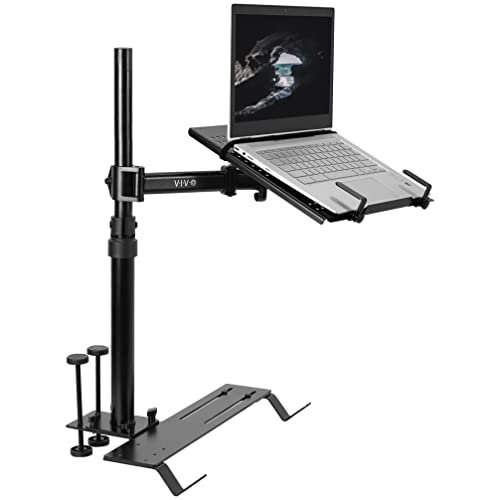
The VIVO mount emphasizes full articulation with a telescoping pole that extends from 18.5” to 26.3” and a 9” adjustable arm range. It accommodates laptops up to 17” and supports stable mounting thanks to multiple feet designed for vehicles with exposed floor seat bolts. It’s ideal for truck and SUV drivers who need a roomy tray and easy disconnect. The main caution is ensuring the mounting feet align with your seat rails and that the tray’s weight capacity matches your device.
SPIRRELAB Car Laptop Mount

This model focuses on stability with a five-clamp tray and a triangular base created by two base mounting points and riser bases. It supports laptops and tablets from 9” to 17” and includes USB-powered cooling fans to prevent overheating. It’s well-suited for drivers who need steady performance on bumpy roads. A limitation is the potential for bulk on smaller vehicles, which could crowd the passenger area if mounted near seating.
Mount-It! Car Laptop Mount

The Mount-It! system is designed to convert a parked vehicle into a mobile workspace, supporting laptops from 12″ to 15.4″ and up to 9 lbs. It installs no-drill to the front passenger seat and offers full-motion adjustment. It’s best for professionals who frequently stop for administrative tasks, such as dispatch or scheduling. A caution: ensure this fits with your seat configuration and that installation does not interfere with airbags or seat controls.
MELIPRON Truck Mount For Ford F-Series

This MELIPRON model is tailored for Ford F-150 and related trucks, with no drilling and dual cooling fans to protect the laptop. The height is adjustable and the tray rotates 360°, allowing optimal visibility from different seating positions. It’s a strong pick for Ford fleet drivers or personal owners who want a vehicle-specific fit. A potential limitation is that it prioritizes Ford-fitment, so it may not suit non-Ford interiors without compatibility checks.
Buying Guide: Key Considerations For Vehicle Laptop Stands
- What vehicle type are you mounting to? Some mounts are seat-rail specific, others use universal feet. Choose based on interior compatibility and ease of installation.
- Is cooling important for you? Laptops can overheat in enclosed spaces. Look for built-in fans or ventilated trays to protect performance during long sessions.
- What size laptop do you use? Ensure the tray supports your screen size and weight. Bigger laptops may need sturdier bases and wider clamps.
- How adjustable must it be? Consider height, tilt, and 360° rotation. Full-motion models help reduce neck/eye strain and accommodate different drivers.
- Is no-drill installation essential? If you need to remove the mount for resale or vehicle leases, no-drill options are preferable.
- What is your mounting footprint? Some bases are large or bulkier; check space around the passenger seat and dashboard to avoid interference with pedals or airbags.
Practical Comparison At A Glance
- Best for rugged trucks: SPIRRELAB with strong base and 5 kg capacity.
- Best for Ford fleet users: MELIPRON Ford-specific model for seamless compatibility.
- Best full-motion flexibility: VIVO MOUNT-CAR01 for extended height and multi-axis adjustments.
- Best no-drill general use: Mount-It! for a straightforward, park-and-work setup.
- Best cooling emphasis: MELIPRON dual-fan designs for continuous use in warm vehicles.
FAQ
- Q: Do these mounts require drilling in all cases? A: No, several models are no-drill and mount to existing seat rails or uses alternative fasteners.
- Q: What laptops are compatible? A: Most mounts support laptops from roughly 9” to 17” depending on the tray size and weight rating.
- Q: Can I remove the mount quickly? A: Yes, many models are designed for easy removal without tools, suitable for personal or rental vehicles.
- Q: Do these mounts interfere with airbags? A: Proper placement avoids airbag interference, but verify clearance with your vehicle’s interior layout.
- Q: Is cooling essential for all trips? A: In hot climates or long drives, built-in cooling helps maintain performance and longevity.
- Q: Are all mounting bases secure on bumpy roads? A: Most use multiple contact points and clamps to distribute weight; always verify the base is firmly attached before use.