The best OBD scanners for all cars are those that work across multiple makes and models, provide clear fault codes, and offer practical data to pinpoint issues quickly. This guide highlights five reliable options that cover broad OBDII compatibility, live data, and essential diagnostics. Each pick is suitable for DIYers, casual drivers, and hobbyists who want quick insights without visiting a shop. Read on to compare features, ideal buyers, and potential limitations.
Summary table of chosen products
- Product: ANCEL AD410 Enhanced OBD2 Scanner — Best for comprehensive OBDII diagnostics and EVAP tests
- Product: MOTOPOWER MP69033 Car OBD2 Scanner — Best value with wide protocol support
- Product: BlueDriver Pro Next Gen OBD2 Scanner — Best for iPhone/Android users needing detailed reports
- Product: FOXWELL NT604 Elite — Best 5-in-1 diagnostic including ABS/SRS
- Product: VDIAGTOOL VD10 OBD2 Scanner — Best DIY-friendly tool with extensive code lookup
ANCEL AD410 Enhanced OBD2 Scanner

Best for: Users who want broad OBDII coverage and enhanced diagnostics across various car types. The AD410 supports all OBDII vehicles and offers quick fault code reading and clearing, plus EVAP and O2 sensor testing. It is powered via the vehicle’s OBDII port, with no extra battery required, making it accessible for quick checks before emissions testing.
Why selected: It combines wide compatibility with extended diagnostic capabilities like EVAP testing and 42,000+ DTC lookups, helping users identify root causes beyond simple engine codes.
Limitations: It is primarily an engine code reader and does not support comprehensive control of every vehicle system, so it’s less suitable for deep-system diagnostics compared to multi-system scanners.
MOTOPOWER MP69033 Car OBD2 Scanner

Best for: Budget-conscious users who need broad protocol support across many 1996+ vehicles. The MP69033 covers 9 OBDII protocols, reads/erases codes, shows live data, and provides real-time graphs on a 2.8-inch LCD. It’s a solid entry-level option for frequent DIY diagnostic sessions.
Why selected: The wide protocol support and simple display make it easy to troubleshoot common problems on most cars without external devices or subscriptions. It’s especially helpful for quick checks on multiple vehicles.
Limitations: It does not offer Bluetooth connectivity or advanced vehicle-specific data for all brands, and some newer systems may require more capable interfaces for deeper diagnostics.
BlueDriver Pro Next Gen OBD2 Scanner
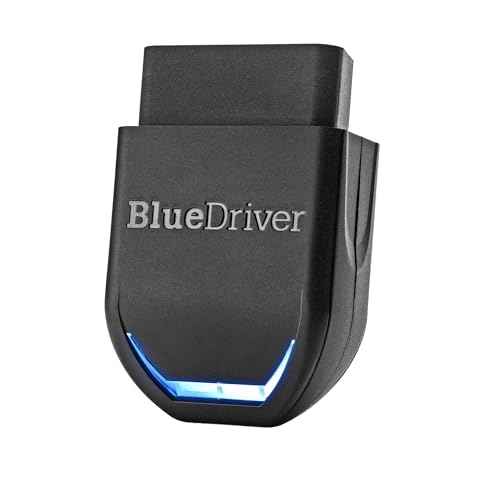
Best for: Smartphone-first users who want professional-grade diagnostics with technician-verified repair reports. The BlueDriver Pro connects via Bluetooth to iPhone or Android and offers extensive codes for engine, ABS, SRS, TPMS, and more, plus live data and repair guidance.
Why selected: It turns a mobile device into a powerful diagnostic tool with unlimited, technician-verified repair reports matched to VINs. It’s ideal for ongoing monitoring and thorough troubleshooting across many model years.
Limitations: It relies on a mobile device for use, so users who prefer standalone handheld units may find it less convenient in some scenarios.
FOXWELL NT604 Elite OBD2 Scanner

Best for: Car owners who want a multi-system diagnostic tool that covers ABS, SRS, transmission, and engine, with live data and data playback. The NT604 Elite provides a comprehensive view of vehicle health without needing extra software.
Why selected: The 5-in-1 capability broadens diagnostic scope beyond standard OBDII checks, helping identify issues in critical subsystems before they escalate into expensive repairs.
Limitations: It’s a diagnostic tool, not a repair device. Clearing certain codes may require you to address the underlying issue first before the code can be reset.
VDIAGTOOL VD10 OBD2 Scanner
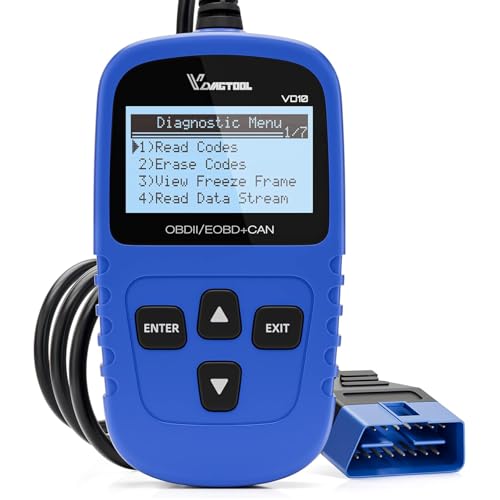
Best for: DIYers who want a straightforward tool with clear DTC definitions and a robust built-in code database. The VD10 reads and clears codes, shows live data, and provides I/M readiness and freeze-frame data for quick troubleshooting.
Why selected: Its user-friendly interface and built-in DTC definitions help users quickly identify faults, making it a practical every-day diagnostic companion for many drivers.
Limitations: As a more basic tool, it may lack advanced multi-system features found in higher-end scanners, and some newer vehicle systems could require more capable software for full coverage.
Buying Guide: What To Consider When Choosing An OBD Scanner For All Cars
- Compatibility: Look for devices that support all OBDII vehicles and a wide range of protocols (including CAN). Consider brands with frequent updates to cover newer models.
- Data depth: Decide between basic code reading/clearing and advanced data like live graphs, VIN retrieval, I/M readiness, freeze frame, and repair reports.
- Interface: Decide between handheld scanners, Bluetooth/tablet-connected tools, or phone-based apps. Mobile-connected devices offer ongoing updates and cloud assistance but require a device to run the app.
- Ease of use: Favor tools with clear menus, quick access to read/clear codes, and intuitive data presentation. A large display or readable screen helps on-the-go diagnostics.
- System coverage: If you need more than engine codes (ABS, SRS, transmission, EVAP, etc.), choose multi-system scanners or model-specific tools that still offer broad compatibility.
- Power source: Handheld devices draw power from the vehicle or battery, while Bluetooth tools may rely on a connected device for power. Ensure power needs align with your use case.
- Data reliability: Tools with built-in DTC libraries and VIN lookup speed up diagnosis and reduce guesswork. Consider products with established support and frequent updates.
Frequently Asked Questions
- What is an OBDII scanner and does it work on all cars? — An OBDII scanner reads standardized diagnostic codes from vehicles built after the early 1990s, and most tools support a broad range of protocols for many makes and models.
- Do I need a Bluetooth scanner or a wired handheld? — Bluetooth scanners pair with a smartphone or tablet for portable use, while handheld units work without a separate device. Your choice depends on preference for mobility and screen size.
- Can an OBD scanner fix my car, or just diagnose it? — No scanner repairs cars directly. It helps identify faults so you can address root causes; some tools can clear codes after repair.
- Will a scanner read ABS/SRS data? — Some multi-system scanners (like NT604 Elite) read ABS/SRS data and other systems; basic readers typically focus on engine codes.
- Is there a subscription for using an OBD scanner? — Some advanced tools and apps offer ongoing subscriptions for enhanced features or repair reports, but many scanners provide core functions without fees.
- How do I know if a scanner supports my vehicle? — Check the product’s compatibility list and protocol support for your year, make, and model. If unsure, contact the seller’s support.