Looking for a reliable programming tool for cars? This guide highlights five top options that cover OBD-II diagnostics, J2534 pass-thru reprogramming, and feature-rich resets. These tools are suitable for professional shops, serious hobbyists, and technicians who want dealer-level capabilities without multiple devices. The top picks balance ease of use, broad vehicle support, and practical limitations you should consider before buying.
| Product | Best For | Key Strength |
|---|---|---|
| TOPDON ONE Bidirectional Scan Tool | Technicians needing dealer-grade coding and topology mapping | J2534 pass-thru, 10.1″ touchscreen |
| ANCEL AD310 | Budget-conscious DIYers | Wide compatibility, simple live data |
| XTOOL D5S | Home mechanics and pros needing multi-system access | 16 resets, CAN FD & FAC AutoAuth |
| TOPDON RLink J2534 | Pro shops needing OEM-level programming | High-speed pass-thru, 17+ brands |
| Niathi FT-OP500-KIT | Compustar installers and feature programming | USB-based option programming |
TOPDON ONE Bidirectional Scan Tool

The TOPDON ONE is designed for professional use with a 10.1″ touchscreen and dual WiFi, delivering a fast, lag-free diagnostic experience. It supports J2534 pass-thru, enabling reprogramming with OEM software via TOPDON’s RLink platform. This makes it suitable for shops that need dealer-level coding and topology mapping to visualize a vehicle’s ECU network in real time. Best for technicians who require accurate module relationships and the ability to code and adapt vehicles in-house. A potential limitation is the reliance on compatible OEM software for full coding features, which may require ongoing access via the RLink ecosystem.
- Best for: Professionals who want dealer-grade capability in a single device.
- Why selected: Combines pass-thru programming with topology mapping for precise module analysis.
- Limitation: Access to full coding depends on software compatibility and subscriptions within RLink.
ANCEL AD310 Classic OBD II Scanner
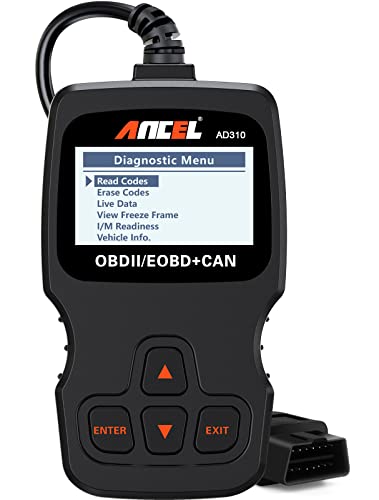
The AD310 is a compact, reliable choice with broad compatibility for 1996 and newer OBD2 vehicles. It excels at quickly reading and clearing emission-related codes, viewing live data, checking I/M readiness, and retrieving vehicle information. This model is ideal for DIYers who want a sturdy, easy-to-use tool for routine maintenance and code diagnostics. A notable limitation is that its feature set is basic compared with more advanced, multi-system scanners.
- Best for: DIYers needing a simple, dependable code reader for common maintenance tasks.
- Why selected: Strong live data readouts and easy code clearing in a compact form.
- Limitation: Fewer advanced features compared with multi-system diagnostic scanners.
XTOOL D5S OBD2 Scanner

The XTOOL D5S provides a broad diagnostic reach with 16 reset functions across Engine, ABS, SRS, and more, plus CAN FD support and FAC AutoAuth. It is well-suited for home mechanics and small shops that need quick resets and reliable DTC reads with live data graphs. The note to verify compatibility before ordering helps avoid vehicle-specific limitations. This tool is a solid all-around choice when you need multi-system access without dedicated dealer equipment.
- Best for: Users who want extensive reset options across several vehicle systems.
- Why selected: 16 resets and full OBD2 diagnostics with live data and graphs.
- Limitation: Some vehicles may require compatibility checks before use.
TOPDON RLink J2534 Reprogramming Tool

The RLink box is designed for technicians needing high-speed J2534 pass-thru programming and OEM-level diagnostics. It supports DoIP, CAN-FD, and 17+ brands, making it a versatile centerpiece for shops that perform reprogramming across various makes. It reduces the need for multiple OEM tools by delivering guided troubleshooting, coding, resets, and programming in one device. A potential limitation is the upfront learning curve and need for compatible OEM software access to maximize its capabilities.
- Best for: Pro shops that require fast OEM-level programming across many brands.
- Why selected: High-speed data pass-thru and broad brand coverage streamline workflows.
- Limitation: Requires familiarity with OEM software workflows and potential software subscriptions.
Niathi FT-OP500-KIT Compustar Programmer

The FT-OP500-KIT is a focused programming tool for Compustar systems. It enables quick feature changes and adjustments such as programmable output controls and Aux timing. This is a practical choice for installers who need efficient feature programming across Compustar products. A caution is that it is specialized for Compustar ecosystems, so it may not cover non-Compustar devices.
- Best for: Compustar installers and users needing quick feature programming.
- Why selected: Simplifies customization of Compustar systems with USB updates.
- Limitation: Limited to Compustar product families.
XTOOL TP380 TPMS Tool & OBD2 Scanner

The TP380 integrates TPMS programming with a multi-system OBD2 scanner, offering 5-system diagnostics and 13+ resets. It supports 315MHz and 433MHz sensors, and provides lifetime free updates. This 2-in-1 design is useful for tire maintenance alongside engine and ABS checks. A limitation is that TPMS-specific programming may be vendor-dependent, so confirm sensor compatibility before use.
- Best for: Users needing TPMS programming plus general diagnostics in one tool.
- Why selected: 3-in-1 capability with lifetime updates keeps costs predictable.
- Limitation: Sensor compatibility should be verified for each vehicle and sensor type.
Buying Guide
What to consider when choosing a car programming tool:
- Vehicle compatibility: Check supported brands and whether the tool covers your vehicle years and models. Look for CAN FD, DoIP, and J2534 support if you plan reprogramming across many platforms.
- Scope of features: Decide between basic code reading/clearing, multi-system diagnostics, live data graphs, and dealer-level coding or pass-thru programming.
- Interface and usability: A responsive touchscreen and stable wireless connections improve efficiency. Consider whether USB, Wi‑Fi, or both are needed for your workshop setup.
- Updates and support: Lifetime updates or regular subscription access can affect long-term cost and tool longevity.
- Formal testing and reliability: While not a warranty claim, prefer tools with robust build quality for daily workshop use.
- Learning curve and software ecosystem: OEM-grade features may require familiarity with coding workflows and external software platforms.
Frequently Asked Questions
- What is a J2534 pass-thru tool used for?
It enables programming and reprogramming of vehicle ECUs using OEM software through the vehicle’s diagnostic port. - Do I need a separate tool for TPMS programming?
Not always; some multi-system scanners include TPMS functions, but dedicated TPMS tools may offer broader sensor coverage. - Are CAN FD and DoIP important for my tool?
Yes if you work with newer vehicles or want future-proof diagnostics and faster data transfer. - Can these tools replace factory scan tools?
They can provide many dealer-level functions, but some OEM-specific features may still require factory tools or subscriptions. - Is lifetime updates worth it?
Generally yes for ongoing compatibility and feature access, especially as vehicle electronics evolve. - What should I verify before buying?
Confirm vehicle model coverage, supported functions, update policy, and whether features like topology mapping or coding align with your needs.